Exploring Lilypaly: An Elegant Font for Modern Design
Choosing the right typeface is often the silent architect behind a successful design. It is rarely just about picking a shape; it is about finding a voice. In the vast landscape of digital typography, few styles capture the blend of sophistication and technical precision quite like Lilypaly. This font is not merely a collection of letters; it is a carefully engineered tool designed to bring a touch of modern elegance to any project.
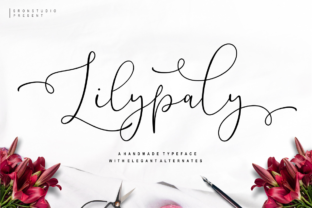
At its core, Lilypaly is a modern script font characterized by its fluid lines and refined aesthetic. However, what sets it apart from other calligraphic styles is its reliance on stylistic alternates. The designer of Lilypaly did not simply draw a standard alphabet and leave it at that. Instead, they meticulously crafted multiple variations for many letters. This attention to detail ensures that when you type, the letters connect seamlessly. Whether you are using the standard characters or swapping in the alternates, the flow remains unbroken, mimicking the natural rhythm of hand-lettering without the messiness that sometimes accompanies it.
Understanding the Technical Beauty of Lilypaly
For those new to typography, a stylistic alternate is essentially a different version of a letter. Imagine writing the letter "a" in three different ways. In a basic font, you are stuck with one option. In Lilypaly, you have choices. This is vital for script fonts because repetition is the enemy of realism. If a font uses the exact same letter shape for every "s" in a sentence, it looks mechanical and robotic.
Lilypaly solves this by offering variety. It allows the text to look genuinely handwritten. The connection points—the spots where one letter meets the next—are engineered to be smooth. This means no awkward gaps and no overlapping strokes that look like accidents. It is a balance of creativity and reliability. You get the artistic flair of a custom font with the technical stability of professional software.
Why Marketers and Business Owners Should Care
For entrepreneurs and small business owners, branding is everything. You want your business to feel approachable yet professional. A font like Lilypaly is incredibly useful for creating a brand identity that feels personal.
Consider a bakery owner designing a logo or a menu. Using a standard block font feels cold and corporate. Using a messy, freehand font might feel unprofessional. Lilypaly sits right in the middle. It offers the warmth of a handwritten note with the clarity required for commercial use.
Marketers can use this font for social media graphics, particularly on platforms like Instagram or Pinterest where visual appeal drives engagement. A quote card written in Lilypaly feels aspirational. Because the font connects elegantly, it creates a visual flow that draws the reader's eye across the screen naturally.
Practical Applications for Creators and Educators
The utility of Lilypaly extends far beyond logos. Its design makes it highly flexible for various project types.
For Wedding Planners and Stationery Designers
Wedding invitations require a specific tone of romance and formality. Lilypaly excels here. Because the font includes so many alternates, you can customize the names of the bride and groom to ensure the letters flow perfectly together. You can avoid the "double letter" problem (where two 'o's or 'l's look identical and boring) by swapping in a different style for the second letter. This level of customization is usually reserved for expensive custom calligraphy, but Lilypaly brings that capability to a wider audience.
For Bloggers and Content Creators
Bloggers often struggle to find a consistent aesthetic for their headers and Pinterest pins. Lilypaly provides a signature look that becomes recognizable to your audience. It adds a layer of professional polish without requiring advanced design skills. If you are a lifestyle or travel blogger, this font helps convey a sense of curated elegance in your imagery.
For Educators
Teachers and educators might use Lilypaly for specific creative projects, such as creating awards, certificates, or headers for classroom displays. It teaches students about the anatomy of letters and how changing a small curve or tail can alter the "personality" of the text. However, educators should note that for body text or early reading materials, a standard serif or sans-serif font is better for legibility. Lilypaly is best reserved for titles and decorative elements.
Evaluating Lilypaly: Is It Right for You?
Different users prioritize different aspects of a font. Here is how to determine if Lilypaly fits your specific needs based on your priorities.
- Ease of Use: For beginners, Lilypaly is user-friendly, provided you have software that supports OpenType features (like Adobe Photoshop, Illustrator, or even Canva Pro). Accessing the alternates usually requires a basic understanding of the "Glyphs" panel, but the default typing experience is already beautiful.
- Quality and Reliability: Professionals will appreciate the kerning (spacing between letters) and the vector quality. It renders cleanly at various sizes, ensuring your designs look crisp whether printed on a business card or viewed on a high-resolution screen.
- Creativity and Flexibility: If you value uniqueness, the sheer number of stylistic options gives you high creative control. You can make two projects look entirely different just by changing which alternates you use.
- Cost and Value: For freelancers, investing in a high-quality font like Lilypaly often saves money in the long run. Instead of hiring a calligrapher for every project, you have a digital tool that mimics the effect at a fraction of the cost.
Matching the Font to the Project
It is important to be realistic about where a script font shines and where it struggles. Lilypaly is a display font. This means it is designed for short bursts of text: headers, logos, invitations, and quotes.
If you try to write a full paragraph or a business report in Lilypaly, you will run into trouble. The connecting script style becomes difficult to read in long blocks. It can cause eye strain for the reader. Therefore, a key piece of advice for graphic designers and marketers is to pair Lilypaly with a clean, simple sans-serif font for the body text. This contrast creates a hierarchy that looks professional and is easy to scan.
Long-Term Usefulness
Trends in design come and go. Overly ornate scripts can sometimes look dated quickly. However, Lilypaly leans towards a "modern calligraphy" style. It is less about frills and flourishes and more about clean, elegant connections. This gives it a longer shelf life. It is versatile enough to look current in a minimalist design context, yet warm enough to fit a rustic aesthetic.
Conclusion: The Lilypaly Experience
Ultimately, Lilypaly is more than just a file you download. It is a bridge between the digital precision of computers and the organic beauty of the human hand. It respects the rules of typography—spacing, weight, and balance—while allowing for the imperfections and variations that make handwriting charming.
Whether you are a small business owner trying to establish a warm brand voice, a hobbyist creating scrapbooks, or a professional designer looking for a reliable script font, Lilypaly offers a solution. It proves that with the right tools, elegance and technicality can coexist beautifully. By understanding how to use its stylistic alternates, you can elevate your projects from simply "text on a page" to a genuine visual experience.